Experience ultimate stability worldwide. Get your Buffer-Free IPTV Server with 99.9% uptime and instant secure activation. View Plans → iew Plans →


Tips for Streaming 4K Without Buffering on Fire TV Stick: The Complete Guide
Watching your favorite content in stunning 4K resolution should be a seamless, cinematic experience — not a frustrating cycle of loading screens and pauses. If you’ve ever sat down ready to enjoy a high-definition movie only to be interrupted by constant buffering, you know exactly how annoying it can be. The good news is that with the right setup and a few smart adjustments, you can dramatically improve your streaming quality. In this guide, we’ll share the most effective tips for streaming 4K without buffering issues on your Amazon Fire TV Stick, so you can enjoy every frame in crystal-clear detail.
Why Buffering Happens During 4K Streaming
Before diving into the solutions, it helps to understand what causes buffering in the first place. 4K content requires significantly more bandwidth than standard HD video. According to Wikipedia’s article on 4K resolution, streaming 4K video typically demands between 15 and 25 Mbps of consistent internet speed, and some services recommend even higher. When your connection can’t sustain that data flow, your Fire TV Stick has to pause playback to buffer — essentially filling up its temporary memory before it can continue.
Common culprits include weak Wi-Fi signals, network congestion, outdated device software, or simply choosing a streaming service that isn’t optimized for high-resolution delivery. Identifying the root cause is the first step toward a smoother viewing experience.
Essential Tips for Streaming 4K Without Buffering
1. Upgrade Your Internet Connection Speed
This is arguably the single most impactful change you can make. For reliable 4K streaming, you should have a minimum of 25 Mbps dedicated to your streaming device. However, if you have multiple devices connected to the same network — smartphones, laptops, smart appliances — your actual available bandwidth could be much lower. Consider upgrading to a faster internet plan or, at the very least, perform a speed test directly on your Fire TV Stick to see what you’re actually working with. One of the most practical tips for streaming 4K without buffering is to simply ensure your plan matches your household’s total streaming demands.
2. Switch to a Wired Ethernet Connection
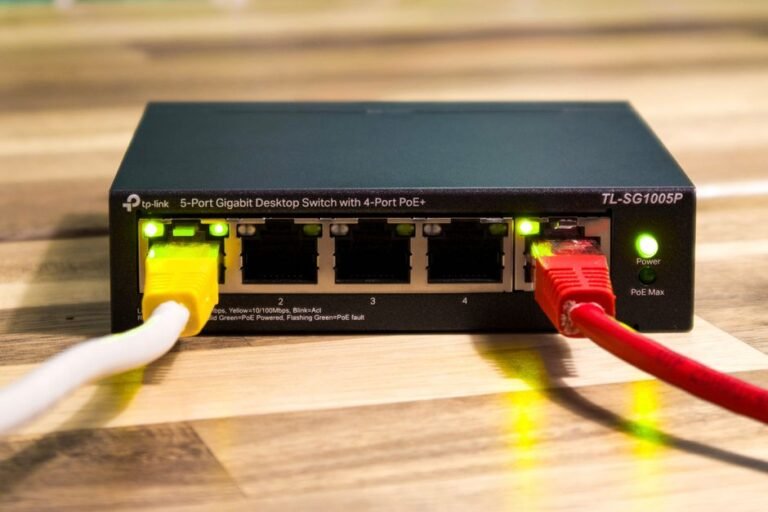
Wi-Fi is convenient, but it’s inherently less stable than a wired connection. The Amazon Fire TV Stick supports Ethernet adapters, and plugging directly into your router can eliminate most signal-related buffering issues. Walls, appliances, and distance from your router all degrade Wi-Fi performance. A wired connection bypasses all of that interference and delivers a consistent, low-latency stream directly to your device.
3. Optimize Your Wi-Fi Setup
If running an Ethernet cable isn’t possible, optimizing your Wi-Fi is critical. Position your router as close to your TV as possible, and ensure your Fire TV Stick is connected to the 5GHz band rather than the 2.4GHz band. The 5GHz band offers faster speeds and is less congested, making it far more suitable for 4K content. You should also reduce the number of active devices on your network during streaming sessions to free up bandwidth.
4. Clear Cache and Free Up Device Memory
Your Fire TV Stick can become sluggish over time as apps accumulate cached data. Clearing the cache regularly is one of the most overlooked tips for streaming 4K without buffering on this device. Go to Settings > Applications > Manage Installed Applications, select your streaming app, and choose “Clear Cache.” This frees up memory and allows the app to run more efficiently, reducing the likelihood of playback interruptions.

5. Choose a High-Quality IPTV Service
Not all streaming services are built equally. Some platforms compress their video streams heavily or rely on overcrowded servers, which leads to degraded quality and buffering regardless of your internet speed. Using a premium service like Zenova TV ensures you’re accessing high-quality, optimized streams with robust server infrastructure designed to support 4K resolution without interruption. Choosing the right provider is genuinely one of the most effective tips for streaming 4K without buffering that many users overlook entirely.
6. Adjust Streaming Quality Settings
Most streaming applications allow you to manually set the video quality. While automatic settings theoretically adapt to your connection speed, they don’t always respond fast enough to prevent buffering during brief network fluctuations. Setting a fixed quality that matches your bandwidth capability can result in a more stable viewing experience. You can experiment between different quality levels to find the sweet spot between resolution and consistency.
7. Keep Your Fire TV Stick and Apps Updated
Software updates often include performance improvements and bug fixes that directly affect streaming stability. Make sure your Fire TV Stick firmware and all streaming applications are always running the latest versions. Go to Settings > My Fire TV > About > Check for Updates. Staying current with updates is among the simplest but most impactful tips for streaming 4K without buffering that anyone can implement immediately.
8. Use a VPN Strategically
In some cases, your Internet Service Provider (ISP) may throttle your connection when it detects high-bandwidth streaming activity. A quality VPN can help bypass ISP throttling and provide a more consistent connection. However, it’s important to choose a VPN with fast servers, as a poorly performing VPN can actually make buffering worse. Test with and without a VPN to see which gives you better results in your specific location.
Additional Performance Tips for Your Fire TV Stick
Beyond the major fixes, there are smaller tweaks that collectively make a significant difference. Restarting your Fire TV Stick before a long viewing session clears temporary memory. Disabling automatic app updates during streaming prevents background downloads from consuming bandwidth. Also, consider limiting the number of apps installed on the device, as too many background processes can slow down performance overall. These additional tips for streaming 4K without buffering may seem minor, but they add up to a noticeably smoother experience.
Frequently Asked Questions
Q1: What internet speed do I need for 4K streaming on Fire TV Stick?
You need a minimum of 25 Mbps for stable 4K streaming. If multiple devices share your network, plan for higher overall bandwidth to compensate for the combined usage.
Q2: Does the Fire TV Stick support Ethernet connections?
Yes, Amazon offers an official Ethernet adapter compatible with the Fire TV Stick. Connecting via Ethernet instead of Wi-Fi significantly reduces buffering and improves stream stability.
Q3: How often should I clear the cache on my Fire TV Stick?
Clearing the cache once every two to four weeks is a good habit. If you notice sudden performance drops or increased buffering, clearing the cache immediately can often resolve the issue quickly.
Q4: Can my IPTV service provider affect buffering even with fast internet?
Absolutely. A provider with overloaded or low-quality servers will cause buffering regardless of your internet speed. Choosing a reliable, premium service like Zenova TV with optimized streaming infrastructure is one of the most critical tips for streaming 4K without buffering successfully.
Q5: Is 5GHz Wi-Fi always better than 2.4GHz for streaming?
For 4K streaming, yes — 5GHz offers faster speeds and less interference. However, it has a shorter range than 2.4GHz, so ensure your router is close enough to your TV for the best signal strength on that band.